



Today we are going to show you one of the Cool Notepad Trick ( Prank ) ever. Mostly people use their notepad to type and save the information. But very few people know that the notepad is lot more than a text editor.
In this article we are going to perform a ” Ghost Keyboard Typing ” Trick. This Process is named as ” Ghost Keyboard Typing ” Trick because you don’t even touch your keyboard but words start displaying in notepad automatically.
Steps To Perform A Ghost keyboard Typing Trick:
Step 1: Open New Text Document
Right-click on the desktop and select create a new text document option or just simply Open a Notepad.
Step 2: Copy And Paste The Code:
Copy the below-given code and Paste it in your notepad document.
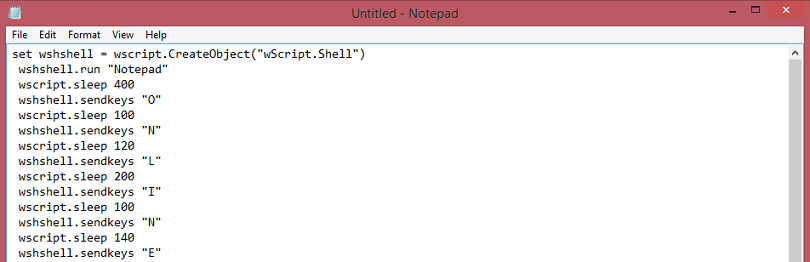
set wshshell = wscript.CreateObject("wScript.Shell")
 wshshell.run "Notepad"
 wscript.sleep 400
 wshshell.sendkeys "O"
 wscript.sleep 100
 wshshell.sendkeys "N"
 wscript.sleep 120
 wshshell.sendkeys "L"
 wscript.sleep 200
 wshshell.sendkeys "I"
 wscript.sleep 100
 wshshell.sendkeys "N"
 wscript.sleep 140
 wshshell.sendkeys "E"
 wscript.sleep 100
 wshshell.sendkeys "C"
 wscript.sleep 50
 wshshell.sendkeys "M"
 wscript.sleep 120
 wshshell.sendkeys "A"
 wscript.sleep 170
 wshshell.sendkeys "G"
 wscript.sleep 100
 wshshell.sendkeys "."
 wscript.sleep 120
 wshshell.sendkeys "C"
 wscript.sleep 160
 wshshell.sendkeys "O"
 wscript.sleep 200
 wshshell.sendkeys "M"
 wscript.sleep 100
Step 3: Save The File
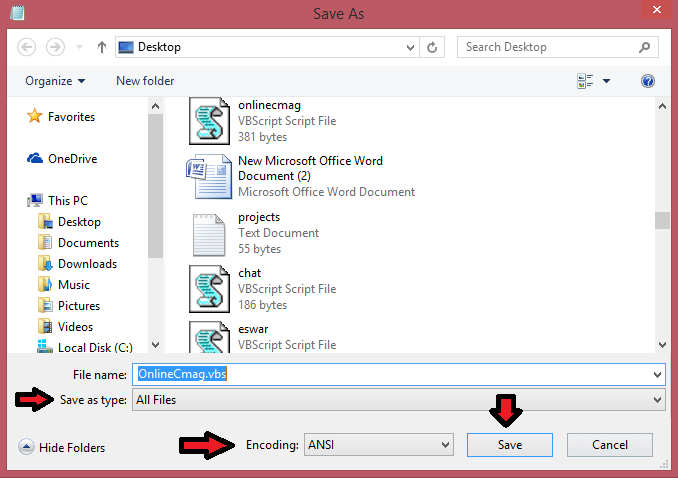
Save this Notepad file As ” OnlineCmag.vbs “, but make sure that the file type is selected as ” All files ” and saved with ” .vbs ” extension.
Step 4: Execute The Saved File

Just double click on the saved File and You will see that the ” ONLINECMAG.COM ” will be typed automatically. This is one of the Best Notepad Tricks ever. Here you can edit the Words In the given Code with any desired words that you want Notepad to type for you.
For Example: ‘THIS GHOST WILL EAT YOU…..’
