
If you wanna disable hybrid shutdown feature in your windows 8 , then most probably you are one of the user’s suffering from restart and shutdown issues . There are many users who are complaining about various shutdown and restart issues in windows 8 . There are many issues like automatic restart or hanging of your desktop while booting and many more . Usually this type of issues are caused due to the new ” Hybrid Shutdown ” feature introduced in Windows 8 . You can know more about this Hybrid shutdown feature from my previous article . To ” disable hybrid shutdown feature ” follow the steps below .
Step To Disable Hybrid Shutdown Feature In Windows 8 :
Step 1 : Go to your charms bar ( i.e search bar ) and type ” power ” in it . Now your windows will automatically look for the phrase and highlight them in the outcomes.
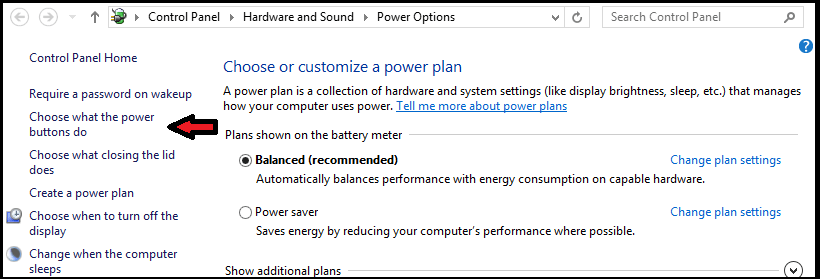
Step 2 : Now Select the “ Settings link ” shown in right-sidebar of search results page. After selecting the search in path as ” settings” click on the ” Change what the power buttons do ” option shown in your results . It will open the Power Options window.
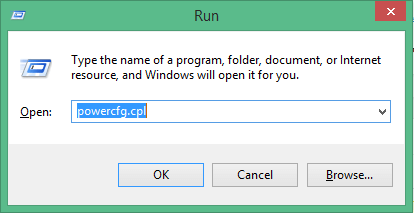
You can even open it by just typing ” powercfg.cpl ” in your RUN dialog box and press Enter . Now a window will be displayed,click on ” Choose what the power buttons do ” option from the list given in the left sidebar.
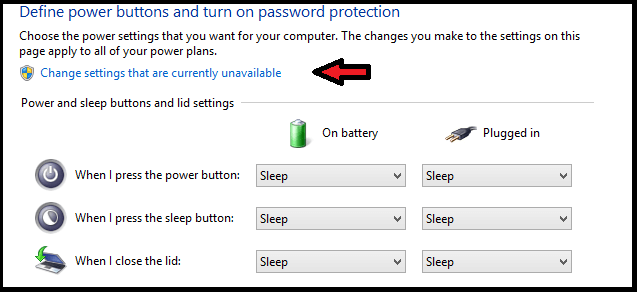
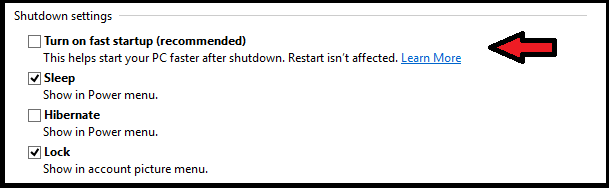
Step 3 : Now click on the ” change settings that are currently available ” option . Then scroll down to bottom and you will find ” Turn on fast startup (recommended) ” option shown in the ” Shutdown settings section ” .
Step 4 : Disable this option by unchecking the check-box and then click on the ” Save Changes ” button.
Step 5 : That’s it. You have successfully fixed your Restart or reboot or shutdown problems in Windows 8.
Share Your Views And Doubts In Form Of Comments…